.jpg?width=100&height=75&name=NextPax%20logo%20(3).jpg)
NexPax is one of the first channel managers or pms systems that can fully automate the onboarding process to Payments by Booking.com for new and existing accommodations. We can easily set you up on the correct program and apply the right Payments by Booking.com payout methods and other settings.
For this to be done right, before onboarding to Booking.com, make sure to complete the following settings, in the Booking.com Channel Settings in NextPax Core. For more information about the Booking.com Channel Settings, look here: https://support.nextpax.com/channel-settings-booking.com
Please understand that NextPax, just like in the Booking.com Extranet - only can enable Payments by Booking.com for eligible properties. So this is how we also check/verify and then enable those properties that are eligibile. High level it means the following.
1. Accommodation Partner completes Payments by Booking.com settings in NextPax Core.
2. Onboarding and enabling of properties from NextPax Core to Booking.com is started.
3. Eligible properties will be put on Payments by Booking.com, during onboarding.
4. Properties can go immediately live on Booking.com, on the right Payments by Booking.com program.
Payments by Booking.com Settings
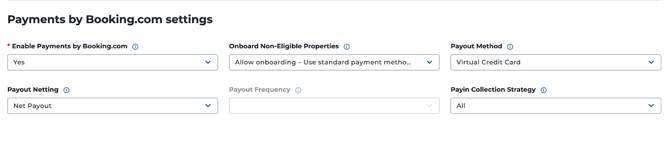
Enable Payments by Booking.com: If 'Yes' is entered NextPax will onboard the accommodations to Payments by Booking.com.
Onboard Non-Eligible Properties. Payments by Booking.com works only for those properties that are eligible to join Payments by Booking.com. As an accommodation partner you may decide that for the non-eligible properties, you still want to distribute these to Booking.com.
If 'Allow Onboarding' is set we continue onboarding of non-eligible properties, for ineligible properties, standard payment methods from your Account Settings will be used.
If 'Stop Onboarding' is set we stop onboarding of eligible properties to Booking.com. Please select this option if under no circumstance you would want to put an accommodation live on Booking.com, while not being on the Payments by Booking.com.
Payout Method Payments by Booking.com offers three payout methods for Payments by Booking.com. From NextPax you can select which method you would like to use.
- Bank Transfer
- Virtual Credit Cards (VCC's)
- Stripe Connect (only supported for vacation rentals in US and Canada)
If you choose Virtual Credit Cards as your payout method, on each reservation you will receive a virtual credit card that contains the exact amount the guest pays for their reservation. This can be charged like any normal Credit Card, using a Point of Sale terminal that supports 'card not present' transactions or through your payment service provider.
If you choose Bank Transfer as the payout method, Booking.com pays you directly into your bank account (entered in the Booking.com Extranet), typically in your local currency.
If you choose Stripe Connect as the payout method, you are connecting your Stripe Account with Booking.com. Stripe is a payment service provider that works with Booking.com to facilitate these transactions to the accommodation partner. Funds are released per reservation, on the reservation check-in day. The actual payout is performed by Stripe. The accommodation partner needs to complete the Stripe KYP (Know Your Partner) form upon connecting the account to Booking.com.
Payout Netting With this setting you can decide how the commission is being paid to Booking.com. There are two options available: gross or nett
A gross payout is when the total reservation amount is paid out. In case of gross payouts, accommodation partners pay their commission & payment service fee invoices either through Booking.com Extranet or by means of an Direct Debit (DD) that debits their bank account automatically with the commission invoice amount.
A nett payout is when Booking.com pays out the total reservation amount, minus the Booking.com commission and payment service fees agreed.
Let's look at the payout netting options available per payout method.
| Payout Method | Gross Payouts | Nett Payouts |
| Virtual Credit Card (VCC) | Yes | No |
| Bank Transfer | Yes | Yes |
| Stripe | Yes | No |
Payout Frequency This setting is only available when the payout method 'bank transfer' is selected, this as Payments by Booking.com offers multiple settings for this payout method. You can select either monthly, weekly or daily. For daily payouts there are some additional guidelines to consult, the most important one will be described here, for the rest kindly consult this article of Booking.com. https://partner.booking.com/en-us/hosts/daily-payouts
- Daily payouts are available at check-in for partners in the US and Canada
- Daily payouts are available at check-out for partners in select EU markets, with a long-term goal of expanding this option globally
When accommodation partners select 'virtual credit cards' these payouts are per reservation
When accommodation partners select 'Stripe Connect', this happens daily on day of check-in.
Payin Collection Strategy This is a field that determines how different guest payment-related policies (for example, "free cancellation", "non-refundable", "Pay later") affect guest payment collection. When NextPax system checks for property eligibility for Payments, Booking.com provides whether ALL or PARTIAL must be used in response.