.jpg?width=100&height=75&name=NextPax%20logo%20(3).jpg)
Important – a new HomeToGo commercial agreement is required via https://formstack.io/1D546
When your listings are already live on HomeToGo through a different channel manager, they cannot simply be re-mapped or transferred to NextPax. HomeToGo treats the switch as a brand-new connection. Before onboarding via NextPax can begin, the partner must first submit a (new) HomeToGo commercial agreement — onboarding cannot start until HomeToGo has received it.
Once the new commercial agreement is in place, HomeToGo can migrate your existing reservations, property reviews and ranking data from your old property IDs to the new property IDs generated via NextPax, using the CSV mapping described below.
Onboarding steps
Before the migration data can be requested, the following must be completed:
- A new HomeToGo commercial agreement has been submitted and received by HomeToGo.
- HomeToGo channel settings are completed in NextPax.
- HomeToGo cancellation and prepayment policy is selected.
- Properties are enabled and successfully onboarded for HomeToGo in NextPax.
Migrating reservations, reviews and ranking data
Once onboarding is complete, HomeToGo will migrate reservations, property reviews and ranking data from your old property IDs to the new property IDs generated via NextPax. To request this, the property manager needs to deliver the CSV spreadsheet below to support@nextpax.com, using the title "HomeToGo – Account Migration". It contains three tabs.
Download Here: HomeToGo Account Migration Template
Tab 1: Old Advertiser ID mapping with NextPax Advertiser ID.
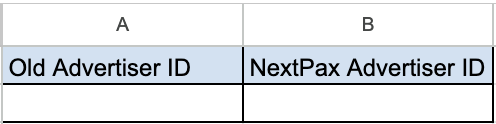
As we create a new account via our API integration, we need to map this with the Old Advertiser ID (Account ID) used previously. The NextPax Advertiser ID is always the NextPax Core Property Manager ID.
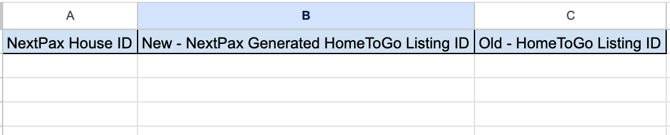
Tab 2: Map newly created properties with your older listings.
To successfully migrate your properties reviews, ranking data HomeToGo needs to map the NextPax created properties with the existing HomeToGo listings ID's
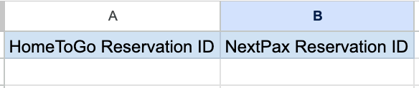
Tab 3: Map reservations for future dates
If you switch to NextPax for channel management we need to be aware of those reservations made previously that are for check-in dates in the future. This as we are getting the updates on these reservations and are processing those for you (cancellations, modifications)
Once this process is completed, please forward the spreadsheet to support@nextpax.com, who will request account migration with HomeToGo.