.jpg?width=100&height=75&name=NextPax%20logo%20(3).jpg)
This guide covers every channel without its own dedicated guide — if your channel is not Booking.com, Airbnb, Vrbo or Trip.com, Tiket.com, Homes & Villas by Marriott Bonvoy, Google, MakeMyTrip, Reconline (GDS), Holidu or HomeToGo, this is your guide. It assumes you know how the onboarding wizard works in general — see the Generic partner guide first.
Good to know about Distribution API channels:
- The wizard is short — four steps: Account Setup → Partner setup → Enable channel → Enable properties. No Settings, Policy, Rate Plans, Messaging or Promotions steps — see §4–§6 for why that's fine.
- Partner Setup depends on the channel — some need nothing at all, some have their own signup form, some arrange the contract with you directly — see §3.
- Your existing rate plans and policies just apply. Rate plans not tied to a specific channel (your "all channels" plans) automatically cover every Distribution API channel — see §5.
- No build wait. These channels retrieve your property content, rates and availability from NextPax themselves — once you enable the channel and your properties, there is no per-property build or push to wait for. See §7.
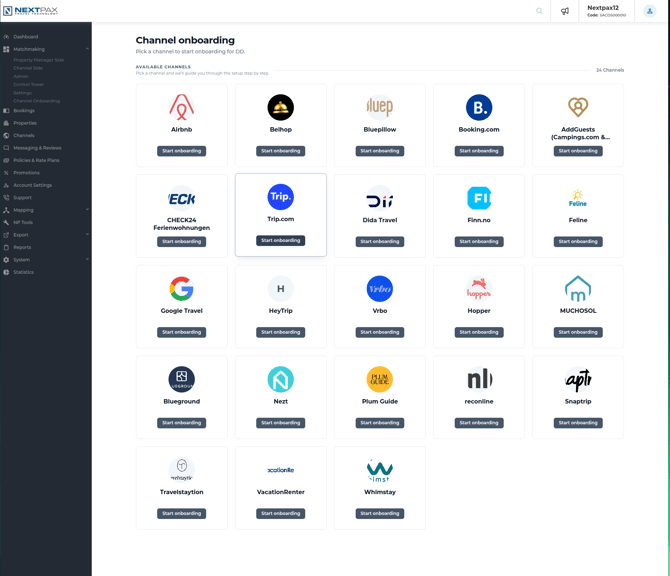
No channel-specific behavior — see the Generic partner guide §2.
3. Partner Setup
The step is titled "{Channel} partner setup" and asks the standard question:
Before you continue, we need to understand whether you already have an active contract or partner setup with {Channel}. This determines the next steps of your onboarding.
- I already have an active contract or partner setup with {Channel}
- I need a new contract or partner setup with {Channel}
The step completes on your answer. Distribution API channels have no automatic connection check inside this step — answering the question is what moves you on; the actual contract can be finished in parallel.
If you already have a partner setup, you get a confirmation and continue:
Got it — you already have an active contract or partner setup with {Channel}. Continue to the next step.
If you need a new one, what happens next depends on the channel — one of three variants:
3.1 No contract needed
Some channels require no contract at all:
Good news — {Channel} does not require a contract or partner setup. You can continue straight to the next step.
3.2 The channel's own signup form
Some channels handle signup on their own site — the step links you there:
{Channel} hosts its own signup form. Open the {Channel} form to request a new contract, then continue here once it's confirmed.
3.3 Arranged via chat
For the rest, the contract is arranged with the channel directly:
{Channel} will send the contract or partner agreement to you directly. Reach out via the chat and we'll get it arranged.
4. Channel Settings
This step does not appear for Distribution API channels — they have no channel-specific settings form to fill in. The readiness check in the Enable channel step (§7) still runs and will tell you if anything is missing; for these channels it typically has nothing to flag.
5. Policy
This step does not appear, and that's fine: Distribution API channels don't take a per-channel cancellation-policy setup. They work from your existing rate plans and their policies — any rate plan not tied to a specific channel (empty channel selection or "All channels") automatically applies to every Distribution API channel you enable. If you already sell anywhere, you likely have such plans; review them on the Rate Plans page, outside the wizard.
6. Promotions
This step does not appear. Distribution API channels do support promotions — they share one common set of promotion types, managed from the regular Promotions page after onboarding rather than inside the wizard.
7. Other / Generic Steps
Account Setup, Enable channel and Enable properties work the standard way — see the Generic partner guide §7. The Rate Plans and Messaging steps do not appear for Distribution API channels — for rate plans, your channel-independent plans apply automatically (§5). Two particulars for this family:
- Enable channel is the whole "go live" moment: with no settings to check, the readiness list is green and you just hit Activate channel (or Skip activation for later).
- Enable properties works the standard way; once your properties are enabled, the channel picks your content, rates and availability up itself — there is no build or publish wait per property.